Safeload Coverage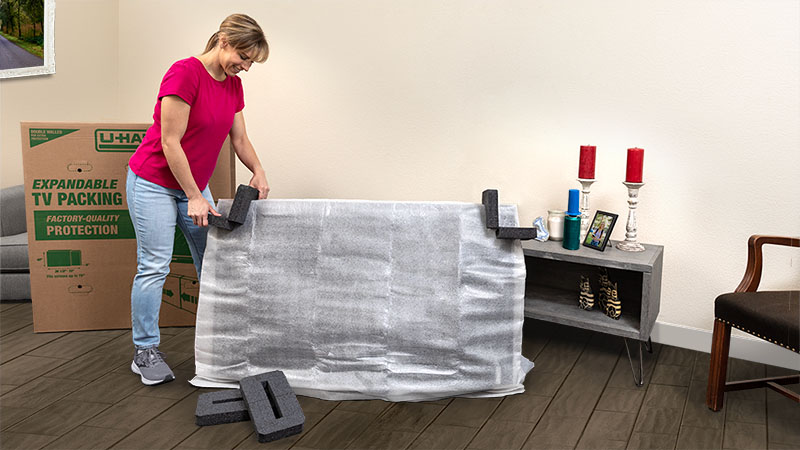
Whether you’re moving a home theater, your gaming setup, or everyday household tech, electronics are among the most delicate items you’ll take to a new home. Learning how to properly pack electronics for moving can prevent damage, save time during setup, and ensure everything works once you arrive.
With a little preparation and the right materials, you can protect your devices throughout the moving process.
Gather the Right Packing Supplies
Before you start unplugging anything, make sure you have the right tools for the job. Using proper materials will help protect your electronics from bumps, dust, and moisture.
- Original boxes: If you still have them, they’re ideal for TVs, monitors, and consoles.
- Sturdy moving boxes: Choose boxes just slightly larger than your item.
- Protective materials: Bubble pack, packing paper, anti-static wrap, or foam sheets.
- Cushioning: Packing peanuts, towels, or blankets to fill empty spaces.
- Organization tools: Cable ties, labels, and small resealable bags for accessories like assorted cords.
Pro tip: You can find moving boxes, bubble packs, and other supplies at your local U-Haul location or online at UHaul.com.
Prepare Electronics Before Packing
Once you’ve gathered your packing supplies, you’re ready to prepare your electronics.
Start by taking a quick photo of the back of your TV, desktop, or gaming console setup before unplugging anything. This gives you a reference point when it’s time to reconnect cables at your new home.
A few simple steps before packing can save you much stress later.
- Back up your data: Copy important files from computers, hard drives, and consoles.
- Remove accessories: Take out discs, cartridges, batteries, and external storage devices.
- Label your cords: Use masking tape or cable tags so you know what belongs to each item.
- Unplug and clean: Dust and debris can scratch or interfere with delicate ports during transit.
How to Pack a TV for Moving
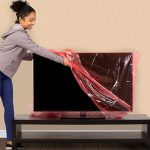
If you’re wondering how to pack a TV for moving, treat it like a glass-framed picture — thin, fragile, and best kept upright.
- Unplug and clean: Wipe the screen gently with a microfiber cloth.
- Use the original or a TV moving box: Secure the TV inside with foam corners or padding.
- Wrap the screen: Use a soft blanket or foam wrap, then secure with plastic wrap or tape.
- Keep it upright: Always move your TV vertically to avoid screen pressure or cracking.
- Pad the gaps: Fill any empty space in the box with furniture pads or packing peanuts, so the TV doesn’t shift.
If you’re moving in bad weather, transport the TV in a climate-controlled vehicle, like a cargo van, when possible.
How to Pack a Gaming Console for Moving
Your gaming console may be compact, but it has sensitive internal parts that need careful handling.

- Unplug and organize cables: Bundle cords with cable ties and label them, then put them into plastic bags to avoid losing them.
- Remove all discs and memory cards: This prevents internal damage.
- Wrap the console: Use anti-static material first, then add bubble pack or foam.
- Pack in a sturdy box: Place padding around all sides for a snug fit.
- Include controllers and accessories: Keep everything in labeled bags inside the same box.
Many DIY movers like to keep their console box near the front of the truck so it’s easy to locate and unpack early. If the console is packed last, it can be unloaded first once you reach your destination — and you can enjoy your games while relaxing from the move.
Tips for Packing Other Electronics
The same care applies to your laptop, computer monitor, speakers, and other devices.
- Wrap screens and fragile parts separately.
- Use anti-static bags for cables, routers, and computer components.
- Group smaller electronics by room or category.
- Mark each box “Fragile” and “This Side Up” so they’re handled with care.
Loading and Transporting Electronics
Once your electronics are boxed, load them strategically.
- Keep boxes upright and secure them, so they don’t slide during transport.
- Avoid stacking heavy boxes on top of electronics, especially TVs and monitors.
- If using a moving truck or cargo trailer, position the boxes holding your electronics toward the front, where movement is minimal.
If you’re moving during extremely hot or cold weather, consider placing your most temperature-sensitive electronics inside your personal vehicle.
Setting Up After the Move
Once you’ve arrived, give your electronics time to adjust to the room temperature before plugging them in, especially if they were transported in an unheated or uncooled space. With your labeled cords and reference photos, reconnecting everything should be straightforward.
Test one item at a time to make sure everything powers on correctly. Keep your boxes and packing materials until you confirm your devices are working.
Get a Hand From the Pros
If you’d rather not pack or load delicate electronics yourself, consider hiring professional help. The Moving Help® Marketplace connects you with local Service Providers who offer affordable packing, loading, unloading, and unpacking services. Each provider is an independent business that specializes in moving labor, so you can find help that fits your needs and schedule.
Moving your TV, gaming setup, or home office equipment doesn’t have to be stressful. Let a Moving Help Service Provider handle the packing and loading while you focus on settling into your new space.